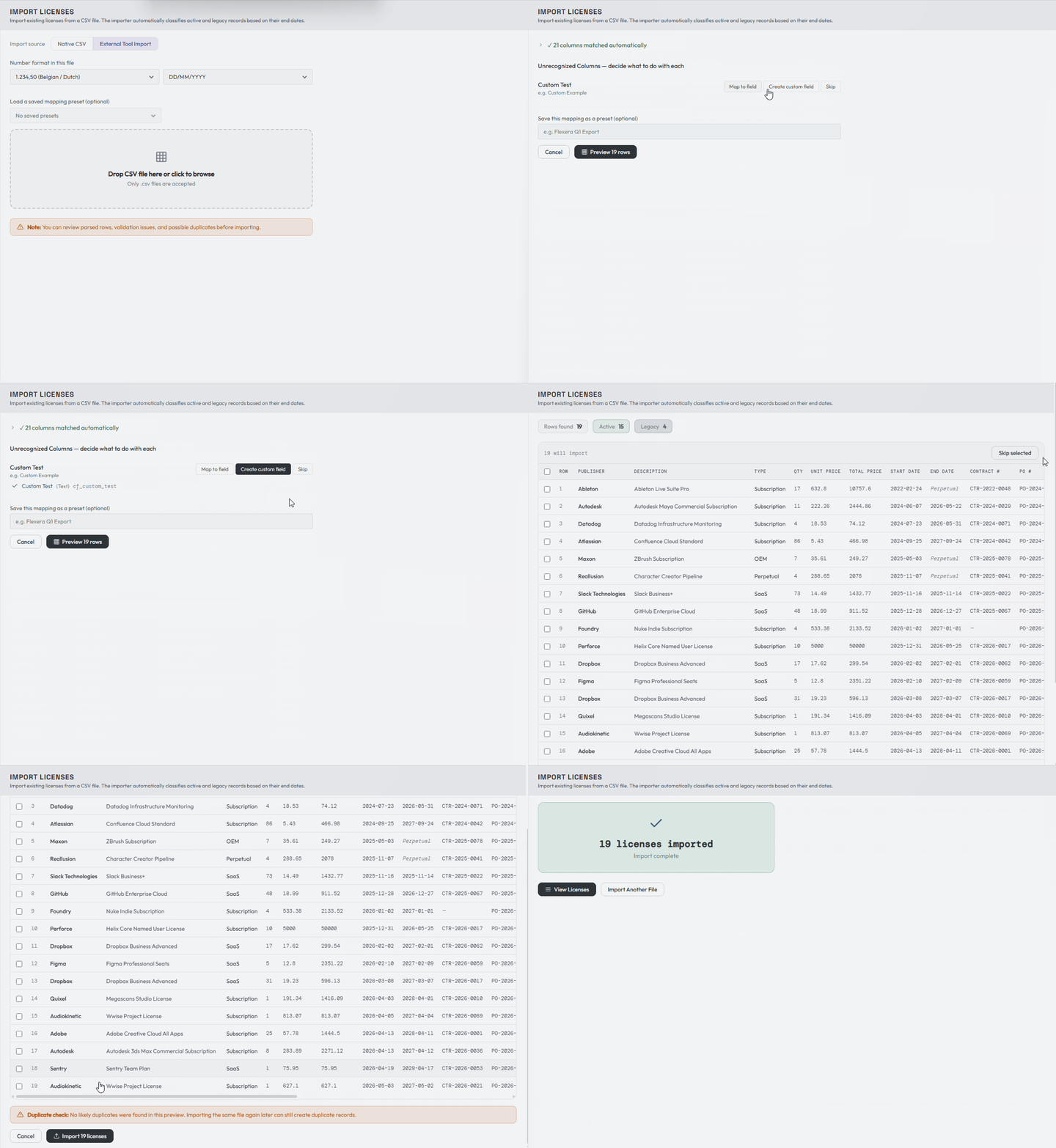
Import mapping and reference
Use this page for detailed parsing, update, and maintenance rules. For a first import, follow the short walkthrough.
Number and date formats
The import number format defaults to your personal Number Format setting. Leave it unchanged when the file uses the same separators, or select the matching example for this file:
1,234.501.234,501 234,50
The override belongs to the import, not to your account. This lets you import a supplier or legacy spreadsheet that uses different separators without changing how LicenseTrack displays numbers elsewhere.
Export Full Data and Export Current View write plain decimals
(1234.5). Import those files with 1,234.50. Files from Export Current
View (localized) use your number format; import them with that format.
Under 1.234,50 and 1 234,50, a number with one dot and exactly three digits
after it (1.234) is ambiguous and the row is refused rather than guessed.
The same import settings also apply to date parsing. Native and mapped imports
accept ISO dates or the date format selected for the file, including custom date
fields. Far-future end dates such as 1-1-2099 are treated as a perpetual
license signal instead of blocking the row.
Updating existing records
When a file contains an LT Ref column, either path offers an auto-enabled option to update the current matching license instead of creating a duplicate. This makes it safe to export a list, make small spreadsheet corrections, and re-import it. Turn the option off when you intentionally want new records.
If you open a LicenseTrack CSV export in Excel, adjust values, and save it again, the importer tolerates the common spreadsheet changes to quoting, delimiter hints, line endings, and localized number formatting. Select the number format that matches the saved file before previewing so prices and quantities are interpreted correctly.
Native Import also recognizes existing custom fields. Export Full Data writes their stable cf_* keys as headers, so custom values round-trip automatically. Files that use the custom field's display name are also matched when that name identifies one field unambiguously. During an LT Ref update, a nonblank custom-field value is patched and a blank cell preserves the value already stored.
Reference-data and preview review
Publisher, supplier, and cost-centre values are resolved against canonical reference data during confirmed execution. Exact names, aliases, and normalized case/whitespace variants reuse the same record and write its canonical display name plus ID. New distinct references can be created automatically; possible duplicates and inactive conflicts require an explicit review decision. Preview does not create references, and skipped or failed rows do not leave reference records behind.
The preview table starts with the main commercial and ownership columns visible. Use Columns to hide fields temporarily when a wide file is difficult to review; this changes only the preview, not the imported data. Maintenance rows with no resolved parent provide a searchable picker for an existing eligible parent. Reference-data review can be collapsed, and one bulk decision can be applied to unresolved possible duplicates before individual exceptions are reviewed.
Field mapping and secondary contacts
The native template and manual mapping include the current LicenseTrack fields, including request date, purchase date, procurement reference, parent LT Ref, and secondary contacts. For external exports with several owner email columns, map the primary owner to Budget Owner and any additional people who should be copied on renewal emails to Secondary Contacts. That target can accept more than one source column.
The Contact Email column holds the Supplier Contact: whoever you bought from. Files that use a Supplier Contact header, or the older Publisher Contact header, import into the same field.
Renewable and Type Description
Registry exports include Renewable and Type Description columns, and both import back:
- Renewable accepts
YesorNo(alsotrue/false,y/n,1/0). It is kept only for Service and Other rows and ignored for every other type. A blank cell leaves a Service or Other row as a one-off purchase. An unrecognized value is ignored with a warning. - Type Description says what an Other purchase is, up to 255 characters. It is kept only for Other rows. An Other row without one still imports, with a warning to add a description when the record is next edited.
A one-off Service or Other row whose end date has already passed is retired by the next daily job after import.
Pending Orders CSV exports include a PO Total (manual) column with the order's manual PO total, when one is set.
PO line numbers
The license export contains a PO Line column, and CSV import recognizes it
(also as po_line_number, po_line_item, po_line_no or Item). Purchasing
exports often call the line Item and the product Description; LicenseTrack
reads them that way. If your file uses Item for the product text, map that
column to Software Description instead.
- New records: a free line number in the file is kept exactly, and gaps survive. A blank number is filled with the next free line. When the number is already taken on that PO, or two new rows in the file claim the same number, the preview flags it and the row is imported with the next free line instead.
- Updates matched by LT Ref: the line number in the file is ignored, and the preview says so. If the row changes the PO number, the same rules as editing a single license apply.
See Procurement for how line numbers are issued.
Items and descriptions
Some external exports contain a generic Item column as well as a more exact software description column. LicenseTrack treats Item as a fallback only. If your file has Software Description, that value wins; if duplicate recognized columns are present, the extra columns stay available for manual mapping.
Purchase quantity and PO values
Legacy PO Price (stored only; not used) remains available for compatibility with old imports. It does not update the calculated Total PO Value or create a manual PO override. Because a shared whole-PO override needs deliberate review, set or clear it afterward from any matching license in License Details. A LicenseTrack CSV export may contain the effective Total PO Value for reference; mapping that column back to Legacy PO Price still does not create an override.
Some external tools expose both a purchase quantity and a quantity-per-unit value. Use the purchased entitlement count for Purchase Quantity. A quantity-per-unit value, such as a bundle size or lines-of-code pack size, maps to Quantity per Unit. LicenseTrack derives Effective Quantity as Purchase Quantity multiplied by Quantity per Unit, and uses Purchase Quantity, not Effective Quantity, for price calculations.
Flexera mappings
Flexera exports may include Effective Quantity, Purchase Quantity, and Quantity per Unit. Map Purchase Quantity to the native Purchase Quantity field and Quantity per Unit to the native Quantity per Unit field. If an export only has Purchase Quantity and Effective Quantity, LicenseTrack can derive Quantity per Unit during import when the numbers are valid.
Flexera exports can use Purchase Type values that do not exactly match LicenseTrack's labels. Common values are normalized during import: Software Subscription becomes Subscription, Software Maintenance becomes Maintenance, Software Baseline and Software become Perpetual, and Service becomes Service. Metric values such as Named User, SaaS User, Concurrent User, Device, Microsoft Server Core, Processor, and Processor Points also map to native LicenseTrack metrics. Custom Metric, Unknown, and Other map to Other / Unknown so uncommon metrics can be reviewed after import instead of blocking the file.
Flexera-style boolean columns such as Includes Maintenance, Purchase Includes Maintenance, or Purchase Includes Support can map to Maintenance Coverage. True-like values become Included; false-like or blank values leave the coverage unset so LicenseTrack can apply the normal default for the license type.
Older CSV headers such as support_cost or includes_support are still recognized.
For perpetual, OEM, or freeware rows with included maintenance, imported Effective Date and Expiry Date become maintenance coverage dates while the license record itself remains non-expiring. If no maintenance-cost column is mapped, LicenseTrack defaults Total Maintenance Cost from the line total and shows a warning so you can verify it is not the original perpetual acquisition value.
Maintenance
Perpetual, OEM, and freeware/open-source rows never store an end date. When a file gives one for such a row, it is dropped on import. They remain non-expiring when an included-maintenance end date is in the past. The preview warns that the included maintenance coverage has expired and requires acknowledgement, but it does not classify the parent license as legacy solely because maintenance ended.
Separately tracked maintenance imports need one explicit parent reference, or a clear parent that LicenseTrack can infer earlier in the same file. Import creates that primary parent link. If the preview cannot resolve the parent, choose an existing eligible parent license from the row action before importing. If you skip a same-file parent that LicenseTrack inferred for a maintenance row, the dependent maintenance row is skipped too. This keeps the preview, warning summary, and final write set aligned instead of allowing a child whose parent was never created. If the original purchase record is unavailable, choose Import as legacy unlinked maintenance instead. This creates active maintenance with no parent and marks it for follow-up; it is an import-only exception and still requires warning acknowledgement. Maintenance create rows can otherwise use importer defaults or same-file inference, or Link existing parent. The bulk legacy action shows the number of affected rows. In update mode, imports cannot unlink an existing maintenance record. License Details visibly marks legacy-unlinked records; editors and admins can choose an eligible parent later, which clears the exception and establishes the normal maintenance relationship. If one maintenance renewal covers several perpetual, OEM, or freeware/open-source records, add the additional parent links from the parent license's Maintenance section after import.
Mapping a custom file
Below is an example of a custom file that matches the template and also includes a unique field. You can map it to an existing custom field; admins can create a new definition when one does not exist: