Understanding the license record
Clicking a license in the overview opens the License Details panel:
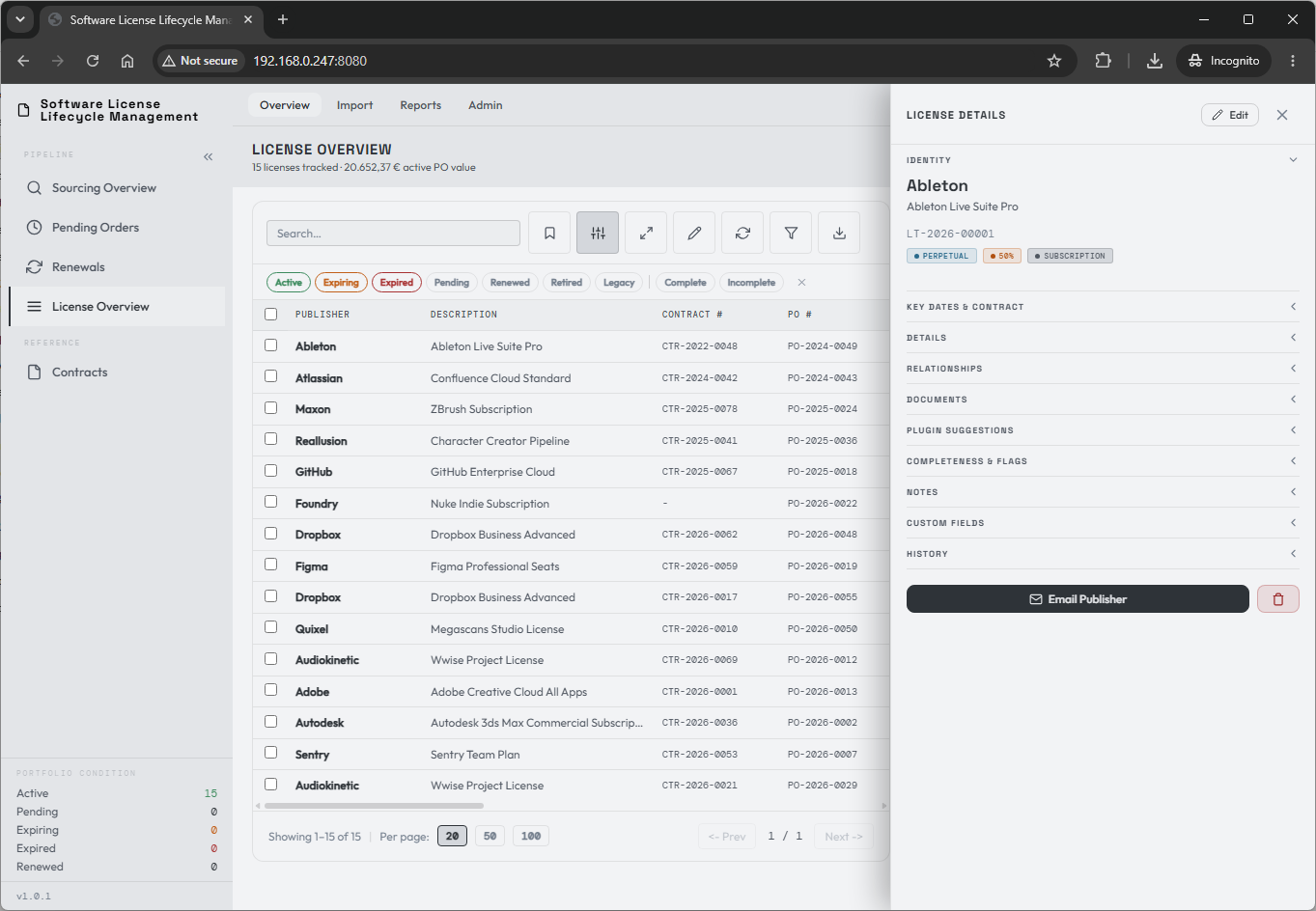
The License Details panel holds all the data of your license record.
The browser address follows what you open, for example /licenses/123 for the
license with record ID 123. Copy it to send a colleague straight to the
license; they see it after signing in, if their access allows. An LT Ref such
as /licenses/LT-2026-00042 also works and opens the current term of that
renewal chain.
Opening a section adds its name to the address, for example
/licenses/123#documents, so a shared link opens the license with that section
expanded. The address names the section you opened last; closing it removes
the name. Section names follow the headings: key-dates, details,
maintenance, relationships, documents, completeness, notes,
custom-fields, and history. Opening and closing sections does not add
Back steps.
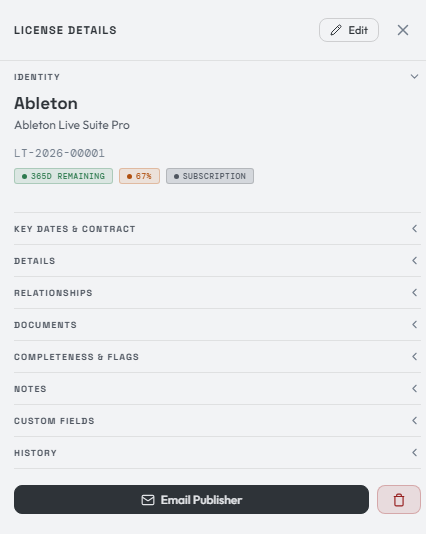
The Identity section is the main view, always visible at the top. It holds key information such as the publisher identity, the license description, and the unique LicenseTrack identifier number.
It also shows three flags: days remaining until expiration, a completeness score (more on that below), and the license type.
The record is organized into the following sections:
- Key Dates & Contract
- Details
- Maintenance
- Relationships
- Documents
- Completeness & Flags
- Notes
- Custom Fields
- History
Let's walk through each one.
Key Dates & Contract
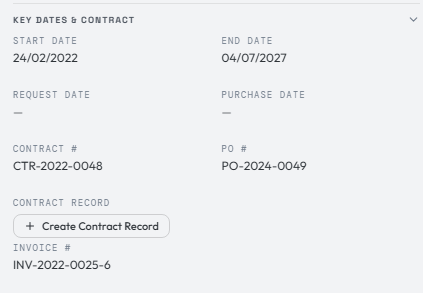
Here you'll find the important dates for your license purchase. The start and end dates represent the license lifecycle. Request date is filled when a license originates from sourcing, including direct freeware conversion. Purchase date is filled only when a pending order exists. Together they give you a clear reading of the path the entitlement followed.
Notice date is an optional manually entered contractual notice deadline, for example the last date to cancel or change renewal terms. It is independent from the license end date and is not calculated automatically. LicenseTrack warns if the notice date is after the end date, but it does not block saving. When the deadline has been reviewed, editors and admins can mark the notice as handled. That stops further notice-deadline reminders for the current notice date; changing the notice date clears the handled state.
Your PO number, invoice number, and — if required — contract number are shown in this section. You can also link the license to a dedicated contract from here. More on that later.
A license can have more than one invoice number. Click the invoice number or the add control to manage the invoice-number list. The first invoice number is the primary invoice shown in the overview table and exports. The full Edit form lists every invoice number as well, so saving it keeps them all. In the overview table, Invoice # can be edited inline only while a license has a single invoice number.
Details
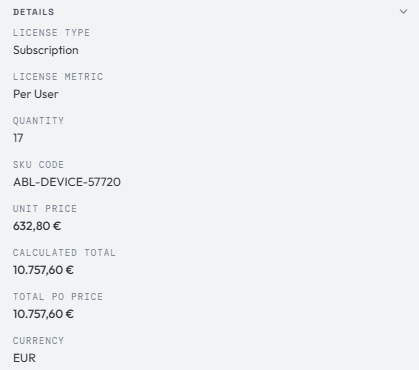
Here you'll find more detail about the license record: the license type, metric, purchase quantity, quantity per unit, effective quantity, SKU code, and pricing.
Use Service for implementation, installation, or service costs associated with a license purchase, and for managed services. Use Other for rare purchase types that should stay visible in the registry; an Other record needs a short Type Description that says what it is.
Service and Other records are one-off purchases unless Renewable? is ticked. A one-off record can still have an end date: a daily job retires it once that date has passed, and it never raises renewal work or expiry alerts. A renewable record behaves like a subscription: it can be renewed, appears in the Renewal Workbench, and counts toward recurring cost.
See Certificates, Domains and Other Renewables for a worked example.
Perpetual, OEM, and freeware/open-source licenses never carry an end date. An OEM or freeware record saved with an end date before 1.1.24 keeps it until the record is next saved in the full Edit form.
The full Edit form offers the Maintenance type only on records that are already maintenance. Add new maintenance from the Maintenance section of the license it supports.
Purchase quantity is the count bought on the order. Quantity per unit describes how much entitlement each purchased unit represents, such as seats in a bundle or lines of code in a pack. Effective quantity is calculated as purchase quantity multiplied by quantity per unit.
The calculated total is purchase quantity times unit price, computed automatically. Effective quantity is not used for spend calculations. The Total PO Value is the acquisition value of the whole purchase order, which may span multiple lines in a single PO. Normally it is the sum of calculated license lines sharing the PO number.
When the invoice provides only one whole-PO amount and no usable line breakdown, an Editor or Admin can use the control beside Total PO Value to set a manual override. The override is shared by every license from the same pending order (or, for licenses not created from one, the same PO number) in the same currency: it can be edited or cleared from any member, and a new member joining the PO inherits it. Moving a license to an existing PO adopts that PO's override; moving it to a new PO does not carry a grouped override with it.
A PO total (manual) entered on a pending order becomes this override on every license converted from it. The line prices stay as quoted; the manual total is never spread across lines.
Freeware/open-source records have no acquisition price; paid maintenance is recorded in Maintenance.
Maintenance
Perpetual, OEM, freeware/open-source, subscription, and SaaS records can classify maintenance as Included. Separately tracked maintenance is available only for perpetual, OEM, or freeware/open-source parents.
Included maintenance stays on the parent license. Its start/end dates define the coverage period, and its price is one flat fee, a covered quantity multiplied by a maintenance unit price, or Free (no charge). The resulting maintenance cost is the total for that coverage period; Free stores a zero cost. For subscription and SaaS records, included maintenance uses the subscription dates and total acquisition value, so those maintenance fields are derived rather than edited separately.
On perpetual, OEM, and freeware/open-source records with Included coverage, Edit maintenance changes the included maintenance period, pricing basis, and cost. The cost is optional. When the maintenance has an end date, the section shows its status: a badge appears when maintenance is expiring or has expired, and the license appears under the Maintenance due filter in License Overview. See included maintenance that is ending for the renewal route.
Switching coverage away from Included keeps the included period in Coverage History, so a later maintenance record does not overwrite it.
Separately tracked maintenance uses its own linked maintenance license, procurement evidence, cost, dates, and renewal lifecycle. The parent shows the active maintenance line's current dates and cost for convenient review. A maintenance line can be linked to more than one eligible parent when one maintenance renewal covers several perpetual, OEM, or freeware/open-source records. Open the maintenance record's Relationships section to review every linked parent license.
Relationships
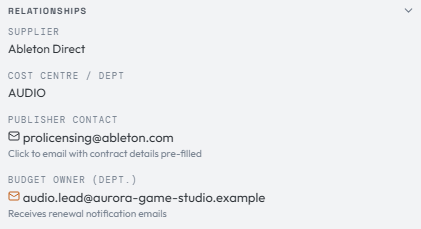
Here you'll find the supplier (where you purchased the license), the internal cost centre or department the license is for, the supplier contact (whoever you bought from: the reseller, or the publisher for a direct purchase), the internal budget or department owner, and optional secondary contacts. Publisher, supplier, and cost-centre fields use canonical reference records; aliases are accepted, while the saved display text is canonical.
The budget owner receives automated renewal notifications, if enabled. Secondary contacts are copied on those budget-owner renewal emails.
Documents
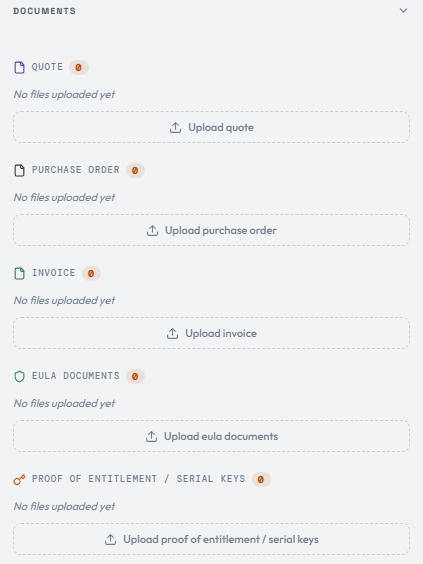
In this section you can upload any document related to the purchase cycle of a software license — quick, easy access to the quote, PO, invoice, entitlements, and EULA files.
Quote, Purchase Order, and Invoice files can be procurement evidence shared by licenses created from the same pending order or the same direct multi-license batch. Sharing follows that internal relationship, never matching PO-number text. License-specific evidence such as an EULA or entitlement certificate remains attached to one license.
PDF documents can be previewed from the document row. The preview opens beside the details panel so you can keep reviewing or editing the license while checking the document. Download remains available for every file the user is allowed to access.
The configured upload maximum applies to the file payload. A file exactly at that limit is accepted; a file one byte over it is rejected. LicenseTrack also keeps a separate bounded allowance for multipart request metadata.
Note
Keep more detailed contract data out of this section. Upload contract files to the dedicated Contracts page instead.
Completeness & Flags
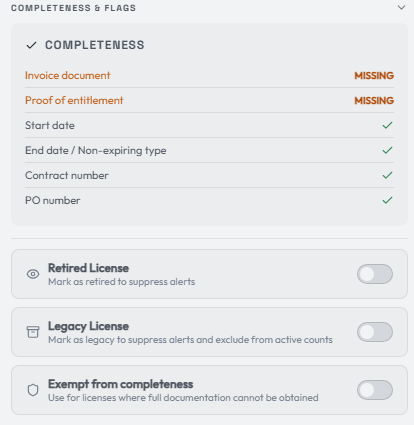
Each purchase has a completeness score. The completeness requirements are defined by the admin under settings. In this example, the invoice, proof of entitlement, start and end date, contract number, and PO number are all required for a license to count as complete. Admins can also include notice date when contractual notice tracking is part of their housekeeping goals.
A new installation starts with PO number, invoice number, and budget owner required. An upgraded installation keeps the requirements it already had.
For a freeware/open-source record, EULA, proof-of-entitlement, and supplier-contact requirements do not apply. Contract, PO, invoice, and quote requirements also do not apply unless the record includes paid maintenance. Department and budget-owner requirements remain useful and continue to apply when enabled.
Licenses that are not marked complete generate email notifications, and you'll see alerts in the top-right menu.
You can also mark a license as retired or legacy, or exempt it from completeness entirely to suppress the alerts.
The Renewal notifications toggle controls expiry emails for this specific license. It is enabled by default. Turn it off when a license is still active but should not send renewal emails, for example because renewal discussions have already started.
Notes, Custom Fields & History
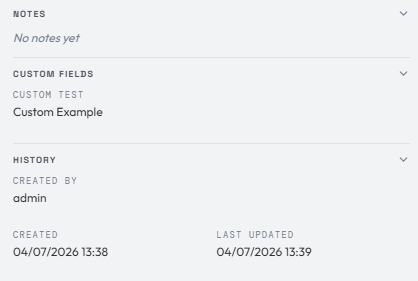
- Notes — add custom messages to the license for follow-up.
- Custom Fields — hold values that have no natural place in the other sections. You define a custom field and its section under the admin menu.
- History — the unique License Record ID, creator, creation and update timestamps, an audit trail of changes to the record, and links back to the sourcing request and, when one exists, the pending order that created the license. The License Record ID identifies this exact database row; it differs from the LT Ref retained across a renewal chain.
For a license in a renewal chain, History also holds the Term chain, which starts collapsed. Expand it to see every term of the chain, including upcoming ones, and open any of them.
When a procurement trail exists, the History section can take you back to the original quote-stage sourcing line and the related pending order. Converted or cancelled procurement records open in their history tables, so you can inspect old quote, PO, invoice, price, and note context without reopening the workflow.
Registry CSV exports use License Record ID for this unique row identifier. Use it when an integration or investigation must distinguish individual rows in a renewal chain that share the same LT Ref.
Email & delete

At the bottom of the panel are the Email Supplier and Delete buttons.
Delete is permanent
Delete removes the license and its license-owned files after the database deletion succeeds. Shared procurement evidence remains while another license is still linked to its order or manual creation batch. There is no recovering deleted data unless you have backed up both the database and document storage.
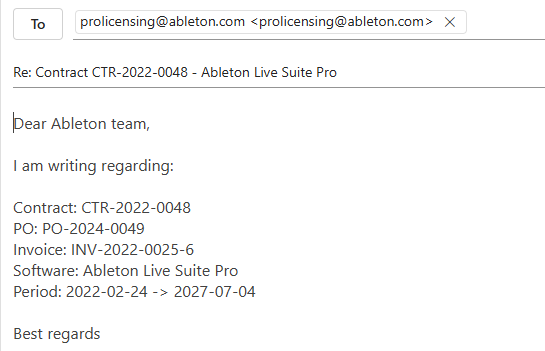
The Email Supplier button opens your default email program, addressed to the supplier contact and greeting the supplier (or the publisher for a direct purchase). It pre-fills the message with the important license data and leaves out any reference that is still blank:
You can achieve the same result by clicking the supplier contact's email address under the Relationships section.